
SFMB - Stage Packs
How Stage Packs work and which packs are included in the current SFMB beta.
- About Stage Packs
- Starting and Continuing a Pack
- Required Game Themes
- Stage Packs Included in the Beta
- Classic SuperMarioBros. StagePack
- Super Mario: Retro Return
- Super Mario Bros MULTI
- Super Mario Bros Plus. DEMO 2
- Beamy's One Screen Puzzles DEMO
- Adventurer's Path
- Candy Nights
- NSMBWii Super World!
- SMB4 - Demo 1
- Super Mario: Snow Drift
- No Theme Left Behind! - (DS)
- FastRun
- Super Side Project Bros.
- Super Mario Bros. Expanded
- Super Mario Bros. Another Adventure
- Sonic: Fate of the Multiverse
- Alphabet Quest
- Super Mario Land: Lost Levels
- Luigi is Missing!
- Creating a Stage Pack
- Related Guides
About Stage Packs
A Stage Pack is a collection of local stages connected as one game. Unlike [[sfmb_stage_world]]{Stage World}, Stage Pack does not browse individual stages from the online server. The packs included with the beta are installed and updated with SFMB.
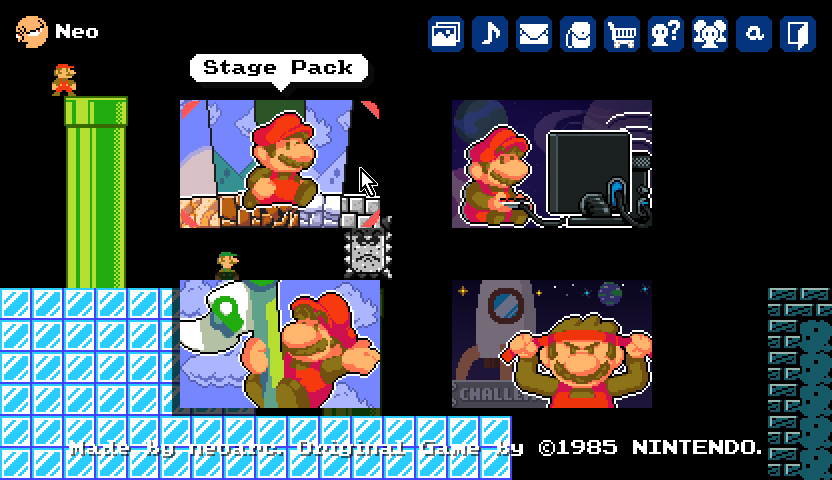
Select Stage Pack on the title screen, choose a pack from the list, and then start or continue its game. The menu displays six packs at a time and can be scrolled when more are installed.
Starting and Continuing a Pack
Each pack defines its own starting stage and links its stages together. The available commands are:
- New Game — resets the pack's player state and begins at its starting stage.
- Continue — resumes from the most recently saved stage with the saved number of lives.
- Stage Select — available for the built-in Classic pack after stages have been unlocked. It is currently disabled for the other packs.
Progress is stored separately for each local profile and each Stage Pack. It can include the most recent stage, unlocked stages, lives, score, coins, current power-up, and stored item.
Required Game Themes
A Stage Pack may depend on one or more Game Themes. SFMB checks those requirements before starting the pack. If a required theme is missing or out of date, play is blocked until it is installed or updated through the [[sfmb_main_menus]]{Game Theme Gallery}.
Stage Packs Included in the Beta
The current beta release configuration includes 19 Stage Packs as of August 29, 2026. Candy Nights remains included but cannot currently be played because its required Game Theme has been removed.
The Added date is when a valid version of the pack first appeared in the game repository. Map files includes title screens, hubs, cutscenes, endings, and other support maps as well as playable stages.
Classic SuperMarioBros. StagePack
- Creator: Nintendo
- Added: September 5, 2016
- Start: 1-1
- Required Game Themes: SMB
- Map files: 45
- Note: This is the only pack that currently provides a working Stage Select menu.
Super Mario: Retro Return
- Creator: Pixelcraftian
- Added: December 11, 2017
- Start: 1-1
- Required Game Themes: SMB, SMBLL, SMO
- Map files: 45
Super Mario Bros MULTI
- Creator: Hamster Man
- Added: June 15, 2020
- Start: 1-1
- Required Game Themes: SMB, SMW
- Map files: 5
Super Mario Bros Plus. DEMO 2
- Creator: Bob Ross
- Added: November 25, 2018
- Start: 1-1
- Required Game Themes: SMB, SMW
- Map files: 28
Beamy's One Screen Puzzles DEMO
- Creator: Beamy68
- Added: December 10, 2018
- Start: Level 1 (Very Easy)
- Required Game Themes: NSMB, SMA4, SMB, SMB3
- Map files: 4
Adventurer's Path
- Creator: PavleStanulov
- Added: January 29, 2019
- Start: 1-1
- Required Game Themes: NSMB
- Map files: 5
Candy Nights
Unavailable: The CandyArcade Game Theme was removed at its creator's request, so this pack cannot currently be played.
- Creator: Abacta (JeromeBotang)
- Added: April 19, 2020
- Start: HubWorld
- Required Game Themes: CandyArcade (removed)
- Map files: 28
NSMBWii Super World!
- Creator: MisterBeanJeans
- Added: October 12, 2020
- Start: 1-1
- Required Game Themes: NSMBWii, SMW
- Map files: 75
SMB4 - Demo 1
- Creator: Several People
- Added: April 4, 2021
- Start: 1-1
- Required Game Themes: SMA4
- Map files: 8
Super Mario: Snow Drift
- Creator: Pixelcraftian
- Added: December 20, 2021
- Start: 1
- Required Game Themes: NSMB, SMA4, SMAS, SMB, SMB2, SMB3, SML2, SMW
- Map files: 29
No Theme Left Behind! - (DS)
- Creator: MisterB
- Added: December 29, 2021
- Start: 1
- Required Game Themes: NSMB, SMB
- Map files: 35
FastRun
- Creator: Dolaniski
- Added: December 30, 2021
- Start: StartRun
- Required Game Themes: NSMB, SMAS, SMB, SMBS, SMO, YoshiIsland
- Map files: 71
Super Side Project Bros.
- Creator: Johanna_SFMB
- Added: May 23, 2022
- Start: Super Side Project Bros.
- Required Game Themes: SMAS
- Map files: 34
Super Mario Bros. Expanded
- Creator: ProneSlone
- Added: July 29, 2022
- Start: TitleScreen
- Required Game Themes: SMB
- Map files: 34
Super Mario Bros. Another Adventure
- Creator: AwesomeMario33
- Added: September 2, 2023
- Start: TitleScreen
- Required Game Themes: SMB
- Map files: 34
Sonic: Fate of the Multiverse
- Creator: Sonic Multiverse Team
- Added: December 18, 2023
- Start: Title
- Required Game Themes: Sonic
- Map files: 192
Alphabet Quest
- Creator: Cloudz
- Added: July 3, 2024
- Start: Autumnal Adventure
- Required Game Themes: MarioBros, NSMB, SMA4, SMAS, SMB, SMB2, SMB3, SMBLL, SML, SML2, SMW
- Map files: 26
Super Mario Land: Lost Levels
- Creator: Cloudz, Several People
- Added: September 26, 2025
- Start: 1-1
- Required Game Themes: SML
- Map files: 50
Luigi is Missing!
- Creator: DragonDMV
- Added: May 17, 2026
- Start: W1-1 Goomba Rock
- Required Game Themes: SMBLL
- Map files: 34
Creating a Stage Pack
To create a Stage Pack, make a new folder under Resources\Map and place the pack's map files and a StagePack.json file together in that folder.
Resources\Map\MyStagePack\
├── StagePack.json
├── 1-1.map
├── 1-2.map
└── ...
A basic StagePack.json uses the following structure:
{
  "CreatedAt": "",
  "Creator": "Your name",
  "CreatorUniqueId": "",
  "InitialStage": "1-1",
  "Name": "My Stage Pack",
  "RequiredGameThemes": "SMB,SMB3",
  "Revision": 1,
  "Version": 2
}
- Name — the name displayed in the Stage Pack menu.
- Creator — the creator or team shown for the pack.
- InitialStage — the filename of the first map without the
.mapextension. This value must not be empty, and the corresponding map must exist in the folder. - RequiredGameThemes — a comma-separated list of the Game Themes used by the pack.
- CreatedAt and CreatorUniqueId — optional creator metadata and may be left empty.
- Revision — the revision number of the pack.
- Version — the Stage Pack metadata format version.
Restart SFMB after creating or changing the folder so that the Stage Pack menu scans it again.
TODO
Related Guides
- [[sfmb_main_menus]]{Main Menus} — An overview of the title-screen menus.
- [[sfmb_stage_world]]{Stage World Guide} — How to find and play individual community stages online.
- [[sfmb_getting_started]]{Getting Started} — How to install, launch, and update SFMB.